
'%3e%3cg%20clip-path='url(%23clip1_1637_2934)'%3e%3cpath%20d='M304.246%20294.611V249.028C304.246%20245.189%20305.687%20242.309%20309.044%20240.392L400.692%20187.612C413.167%20180.415%20428.042%20177.058%20443.394%20177.058C500.971%20177.058%20537.44%20221.682%20537.44%20269.182C537.44%20272.54%20537.44%20276.379%20536.959%20280.218L441.954%20224.558C436.197%20221.201%20430.437%20221.201%20424.68%20224.558L304.246%20294.611ZM518.245%20472.145V363.224C518.245%20356.505%20515.364%20351.707%20509.608%20348.349L389.174%20278.296L428.519%20255.743C431.877%20253.826%20434.757%20253.826%20438.115%20255.743L529.762%20308.523C556.154%20323.879%20573.905%20356.505%20573.905%20388.171C573.905%20424.636%20552.315%20458.225%20518.245%20472.141V472.145ZM275.937%20376.182L236.592%20353.152C233.235%20351.235%20231.794%20348.354%20231.794%20344.515V238.956C231.794%20187.617%20271.139%20148.749%20324.4%20148.749C344.555%20148.749%20363.264%20155.468%20379.102%20167.463L284.578%20222.164C278.822%20225.521%20275.942%20230.319%20275.942%20237.039V376.186L275.937%20376.182ZM360.626%20425.122L304.246%20393.455V326.283L360.626%20294.616L417.002%20326.283V393.455L360.626%20425.122ZM396.852%20570.989C376.698%20570.989%20357.989%20564.27%20342.151%20552.276L436.674%20497.574C442.431%20494.217%20445.311%20489.419%20445.311%20482.699V343.552L485.138%20366.582C488.495%20368.499%20489.936%20371.379%20489.936%20375.219V480.778C489.936%20532.117%20450.109%20570.985%20396.852%20570.985V570.989ZM283.134%20463.99L191.486%20411.211C165.094%20395.854%20147.343%20363.229%20147.343%20331.562C147.343%20294.616%20169.415%20261.509%20203.48%20247.593V356.991C203.48%20363.71%20206.361%20368.508%20212.117%20371.866L332.074%20441.437L292.729%20463.99C289.372%20465.907%20286.491%20465.907%20283.134%20463.99ZM277.859%20542.68C223.639%20542.68%20183.813%20501.895%20183.813%20451.514C183.813%20447.675%20184.294%20443.836%20184.771%20439.997L279.295%20494.698C285.051%20498.056%20290.812%20498.056%20296.568%20494.698L417.002%20425.127V470.71C417.002%20474.549%20415.562%20477.429%20412.204%20479.346L320.557%20532.126C308.081%20539.323%20293.206%20542.68%20277.854%20542.68H277.859ZM396.852%20599.776C454.911%20599.776%20503.37%20558.513%20514.41%20503.812C568.149%20489.896%20602.696%20439.515%20602.696%20388.176C602.696%20354.587%20588.303%20321.962%20562.392%20298.45C564.791%20288.373%20566.231%20278.296%20566.231%20268.224C566.231%20199.611%20510.571%20148.267%20446.274%20148.267C433.322%20148.267%20420.846%20150.184%20408.37%20154.505C386.775%20133.392%20357.026%20119.958%20324.4%20119.958C266.342%20119.958%20217.883%20161.22%20206.843%20215.921C153.104%20229.837%20118.557%20280.218%20118.557%20331.557C118.557%20365.146%20132.95%20397.771%20158.861%20421.283C156.462%20431.36%20155.022%20441.437%20155.022%20451.51C155.022%20520.123%20210.682%20571.466%20274.978%20571.466C287.931%20571.466%20300.407%20569.549%20312.883%20565.228C334.473%20586.341%20364.222%20599.776%20396.852%20599.776Z'%20fill='black'/%3e%3c/g%3e%3c/g%3e%3cdefs%3e%3cclipPath%20id='clip0_1637_2934'%3e%3crect%20width='720'%20height='720'%20fill='white'%20transform='translate(0.606934%200.0999756)'/%3e%3c/clipPath%3e%3cclipPath%20id='clip1_1637_2934'%3e%3crect%20width='484.139'%20height='479.818'%20fill='white'%20transform='translate(118.557%20119.958)'/%3e%3c/clipPath%3e%3c/defs%3e%3c/svg%3e)


'/%3e%3crect%20width='64'%20height='64'%20rx='16'%20fill='url(%23sa-sheen)'/%3e%3cg%20fill='none'%20stroke='%23ffffff'%20stroke-width='3.6'%20stroke-linecap='round'%20stroke-linejoin='round'%3e%3ccircle%20cx='22'%20cy='38'%20r='8.5'/%3e%3cline%20x1='30.5'%20y1='29.5'%20x2='30.5'%20y2='46.5'/%3e%3c/g%3e%3crect%20x='40'%20y='13'%20width='5'%20height='38'%20rx='2.5'%20fill='url(%23sa-pulse)'/%3e%3c/svg%3e)
Run your AI phone team from the AI you already use.
SmartAlex works with Claude, ChatGPT, Codex and Cursor. Ask in plain English and it builds your agents, calls your lists and tells you who to call back.
Say what you want. It does the work.
The same request works in ChatGPT and Claude. Anything that phones people waits for your yes.
 Back at it, Sam
Example chats. The names and numbers are made up.
- You: Please, please start a campaign. AI: “Spring follow-up” is ready: 42 people, Monday to Friday 9 to 5, up to two tries each. Start it? You: Yes AI: Boom. Campaign started.
- You: Who do I need to call back today? AI: Three people. Thandi Mokoena was due at 9:30, James Carter at 2pm and Priya Naidoo at 4:15pm. Want me to call Thandi now?
- You: Set up an agent from my website, yourbusiness.com AI: Done. It knows your services, prices and opening hours. Want a test call to your phone?
- You: How did last week's campaign go? AI: 700 calls, 412 answered (59%). 14 people asked for a callback, and two calls are worth reading first.
- You: What happened on today's calls? AI: 38 calls today. 9 people asked for a quote, 4 want a callback and 2 booked an appointment.
- You: Tell my agent we're closed on Monday for the public holiday. AI: Done. It now tells callers you're closed on Monday and takes a message for Tuesday.
Install it in two minutes.
Choose the app you use. You sign in once with your SmartAlex account.
What you get. The full plugin: all 80 tools and the 11 guides. Once it is in your Claude account, it is in Claude Code too.
What you need. A paid Claude plan (Pro, Max, Team or Enterprise), in the Claude app or on claude.ai.
- 1
Open Plugins
Open Customize in the sidebar, then Plugins.
- 2
Add the SmartAlex marketplace
Press Add, choose Add marketplace and paste this.
- 3
Install and connect
Find SmartAlex and install it. Then open its Connectors tab and press Connect.
- 4
Approve
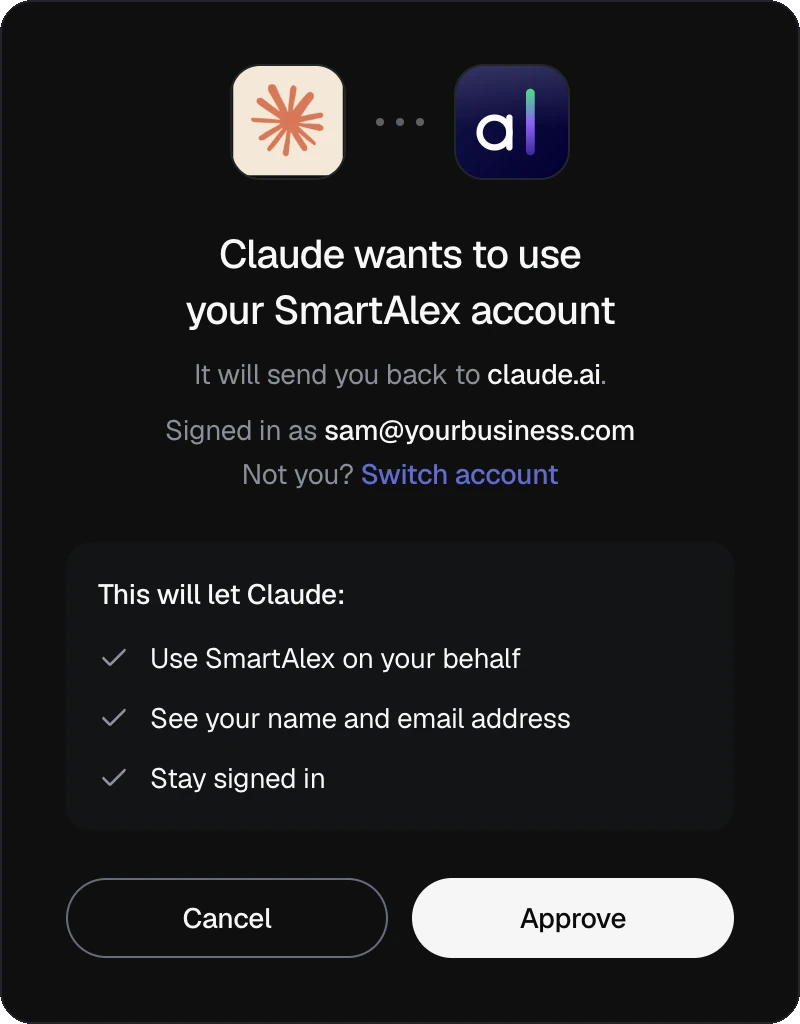
SmartAlex opens in your browser. Sign in and press Approve. That is the only sign-in.
- 5
Check it worked
Start a new chat and ask this. When it answers with your own numbers, SmartAlex is connected.
Then just ask.
Real requests it handles today, in whichever app you use.
“Set up an agent from my website and give it a test call.”
It reads your site and puts the agent live. Once you say yes, it rings your phone so you can hear it.
“Call my 10 newest leads and try each one 4 times.”
It builds the campaign with sensible calling hours and shows you the plan and the cost. Nothing dials until you say yes.
“Who do I need to call back today?”
Overdue first, then today, then any that could not be made and why. It can call one back for you.
“How did last week's campaign go?”
Answered calls, voicemails, callbacks asked for and the cost, counted across every call, with the calls worth reading.
“Move my number to the new agent.”
Done. It also tells you if the old agent is left without a number to answer or call from.
“Invite Sarah as an admin. We're open 8 to 6 now.”
It sends the invitation once you say yes and updates your business hours.
“Add the SmartAlex widget to this site.”
In Claude Code, Codex or Cursor it puts the widget in the right file for your framework, once.
“Let my agent check order status in our system.”
It connects your API to the agent and shows you the exact request. You add the key in SmartAlex, never in the chat.
Eleven guides that know SmartAlex.
They come with the plugin in Claude, Claude Code, Codex and Cursor, and walk the AI through each job step by step.
Setup
Installs the plugin, starts your sign-in and checks the connection works.
The SmartAlex map
Knows every tool, which guide does which job, and the rules for anything that phones people or spends money.
Build an agent
Creates an agent from your website, changes what it says and knows, and gives it a test call.
Call a list
Turns a list of people into a campaign with sensible defaults and starts it after your yes.
Review your calls
Sums up a day or a whole campaign, lists who to follow up and exports the call records.
Callbacks
Shows who asked to be called back, calls them now, moves or cancels a callback and blocks a number.
Phone numbers
Moves a number between agents, buys one at the price it shows you, or releases one.
Team and settings
Invites colleagues, changes roles, and sets your business hours and your own notifications.
Add the voice widget
Puts the SmartAlex widget into your website's code, in the right file for your framework.
Connect an API
Lets an agent look things up in your own systems during a call. Keys stay in SmartAlex.
Webhooks
Sets up your app to get a signed message when a call ends, a contact or deal is added or changed, or a campaign finishes.
Nothing happens without your yes.
Anything that costs money, phones a person or deletes something shows you a preview first, in every app.
A preview, then your yes
You see what will happen, what it costs, how many people will be phoned and whether it can be undone. Then it waits. It runs once, and only after you say yes.
Only what your role allows
The plugin sees exactly what you can see in SmartAlex, with your plan, add-ons and role, and SmartAlex checks again on every call. A viewer can look but cannot change anything.
No keys in the chat
You sign in with SmartAlex and press Approve. API keys are added in SmartAlex, never typed into a chat.
Recordings stay in SmartAlex
Call recordings are never shared through the plugin. You listen to them in Calls, under Call History.
80 tools across your workspace.
Everything here works from a chat, within your plan.
Voice agents
Build an agent from your website, change what it says and knows, undo a change and give it a test call.
Campaigns and calls
Phone a list with retries and calling hours, pause or resume it, read transcripts and see the month's figures.
Contacts and deals
Find, add or import contacts without duplicates, and move your deals from one stage to the next.
Callbacks
See who asked to be called back, call them now, move or cancel a callback, and block a number.
Phone numbers
Move a number to another agent, search for one with its price, buy it or release it.
Team and settings
Invite colleagues, change roles, and set your business hours and your own notifications.
For developers
Add the voice widget to your site, connect your own API to an agent and receive signed webhooks.
Your account
Check your plan, add-ons and minutes, and search SmartAlex's own help.